The Topology perspective in the PMC provides the ability to view and configure sites and brokers from a single view in the PMC, allowing administrators to create paths for Agents to communicate more directly with one another.
In the PMC web client, the Topology perspective is available only to users assigned the Administrator or Power User role.
The Topology perspective contains the following views:
•Sites
•Details
•Map
•Topology
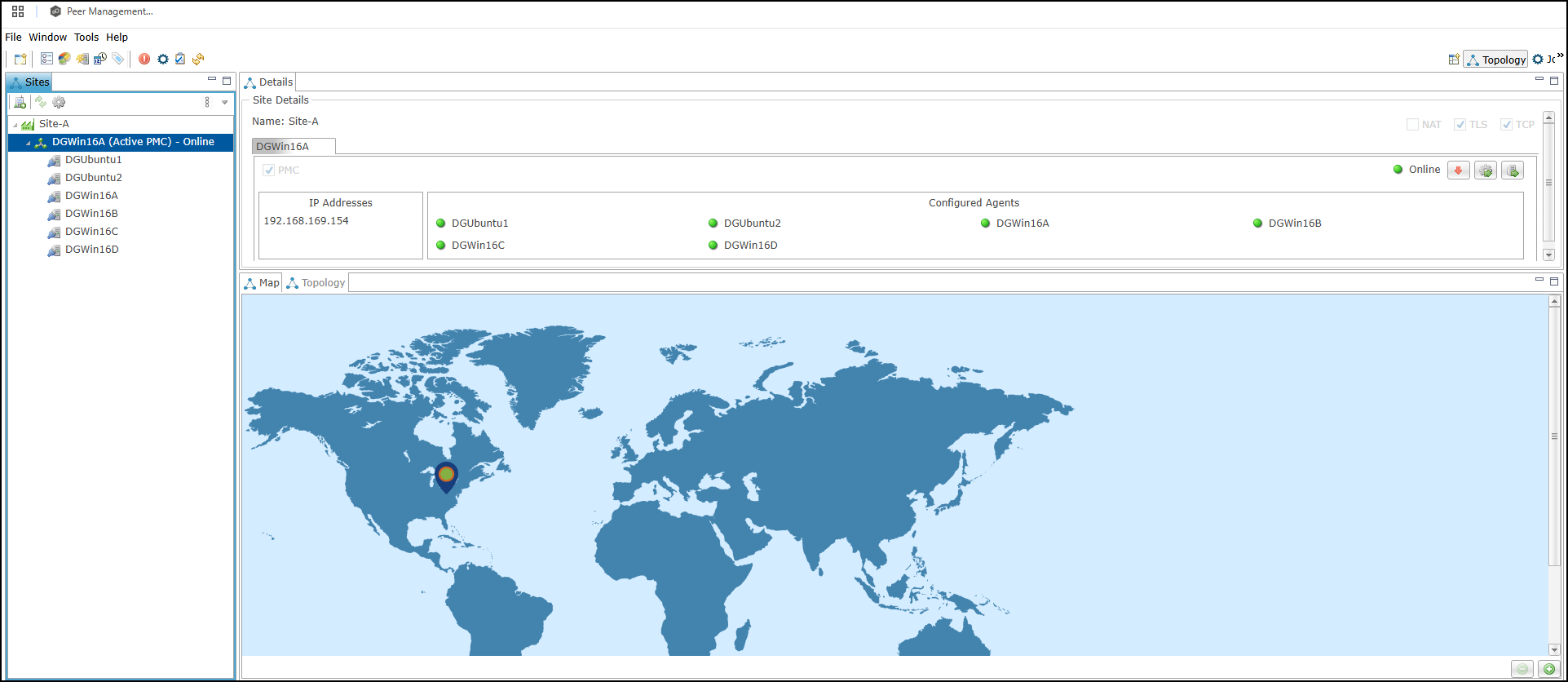
Views in the Topology Perspective
The views in the Topology perspective are described in the following table.
Views |
Description |
|---|---|
Sites |
Provides an overview of the PeerGFS deployment and status of the various components. It displays a hierarchical tree structure containing the configured sites, brokers, and connected Agents. |
Details |
Provides information about brokers configured on a selected site from the Sites view. This display shows broker configuration settings, detailed status information, and Agents configured to connect to it. |
Map |
Provides a visual display of the configured sites and their geographical location. Sites on the map can be dragged into the desired location or selected to display the site details within the Details view. |
Topology |
Shows a logical schematic diagram of the PeerGFS deployment, displaying brokers, Agents, and the connections between them. |
Topology Display Controls
The NAT, TLS, and TCP buttons appear in Details view and control the connection information displayed within the topology diagram.
Button |
Description |
|---|---|
NAT |
Enables or disables the display of Network Address Translation (NAT) connectivity information in the topology display. |
TLS |
Enables or disables the display of Transport Layer Security (TLS) communication paths between brokers and Agents. |
TCP |
Enables or disables the display of Transmission Control Protocol (TCP) communication paths and connection status information. |